Web design · Hosting · Business tools

Your website.
Your workflow.
Working together.

A great first impression is just the beginning. We build websites that connect the customer experience to the everyday work of running your business.

Built from hands-on experience at 83 Woodworks, Southern Maine.

Illustrative workspace
Your business, connected.Your brand here
One connected experience
From the first “hello”
to the final handoff.
Website & leads
Control Center
83Measure
Reimagine
New inquiry capturedWebsite
Next action organizedControl Center
Project details sharedCustomer portal
Good design out front.Useful tools behind it.
Custom websitesLead & project managementCustomer portalsField measurementAI visualization

The idea behind 83media

A website should
earn its place
in your business.

We built the 83 Woodworks platform around real work: finding customers, recording measurements, coordinating partners, sharing progress, and keeping a project moving. That working system is the foundation for what we can build for you.

THE WORKING EXAMPLE / 83 WOODWORKS

One business.
A connected toolkit.

A public website brings people in. A private Control Center keeps the work organized. Customer and partner portals share the right information. 83Measure and Reimagine connect the field visit to the design conversation.

Visit the 83 Woodworks website ↗

Explore the capabilities

The whole business.
Beyond the homepage.

Explore the features built into the 83 Woodworks system. Your version is scoped around the tools your business needs.

01

Your public website

A polished, mobile-friendly place to introduce your business, show your work, and turn interest into a conversation.

  • Custom brand & page designResponsive layouts, navigation, service pages, about pages, and clear calls to action.
  • Portfolio & project galleriesOrganize completed work by category and show before-and-after transformations.
  • Lead captureContact and consultation forms collect customer and project information.
  • Campaign landing pagesDedicated pages for specific services, offers, and advertising traffic.
  • Connected design experienceOffer photo-based Reimagine concepts as part of the path from inspiration to inquiry.
  • Hosting & discoverabilityWebsite hosting, domain connection, search metadata, and analytics setup.
More website features
  • Service categories demonstrated at 83: kitchens and cabinet refacing, built-ins, closets, bath and vanity, garage storage, home office, and commercial millwork.
  • Project photography, video content, social profile links, and tap-to-call contact links.
  • Kitchen and closet consultation pages with project-specific questions.
  • Payment and financing information pages with clear project terms.
  • Search titles and descriptions, canonical URLs, social sharing metadata, structured business data, sitemap, and robots configuration.
  • Google Analytics tracking and lead-source information to help understand where inquiries originate.
  • Privacy and terms pages, footer branding, and consistent navigation.
02

The Control Center

A private CRM and project workspace that puts customers, follow-ups, files, and day-to-day decisions in one place.

  • Needs my attentionOverdue tasks, upcoming actions, follow-ups, and selections awaiting a decision.
  • Leads & sales pipelineTrack stages, proposal values, next actions, follow-up dates, and lead-to-project conversion.
  • Project managementTrack proposal, deposit, design, production, finishing, and installation progress.
  • Tasks & checklistsCompact expandable tasks, due dates, completion filters, and reusable project checklists.
  • Client history & activityContact records, project history, and timelines for calls, emails, texts, visits, and notes.
  • Files, photos & decisionsKeep proposals, contracts, reference photos, selections, and approvals connected to the job.
More Control Center features
  • Dashboard views for upcoming appointments, payment actions, project flow, next actions, and sales pipeline.
  • Dropdown filters by stage, status, activity type, project, and date where applicable.
  • Lead next-action tracking carries into the project when a lead converts.
  • Task filters for open, overdue, completed, and all tasks, with completed items hidden by default.
  • Project checklists for refacing, custom cabinetry, closets, and built-ins.
  • Internal tasks and customer homework with visibility controls.
  • Proposal and contract document tagging, uploads, and file sharing by email or text.
  • Photo uploads, labels, notes, and separate customer, partner, and field-sharing controls.
  • Project updates with customer visibility controls.
  • Selections and approvals, including importing linked Reimagine design choices.
  • Appointment types, scheduling links, confirmations, and Google Calendar connection.
  • Customer and partner contact shortcuts, portal access management, and project QR labels.
  • Fabrication, finishing, installation, and partner billing records within the project workflow.
03

The right view for each person

Give customers, finishers, installers, and trade partners a focused view of the information shared with them.

  • Customer portalProject updates, shared documents and photos, homework, and payment schedule information.
  • Partner portalsShare project information, drawings, files, and coordination details with the people doing the work.
  • Field QR accessA scannable project label opens the shared job-site information.
  • Controlled sharingChoose who can see each supported file or photo and revoke portal access when needed.
More portal & field features
  • Generate secure customer and trade-partner links from the project.
  • Preview portal invitation emails, copy links, and manage active access.
  • Separate views for finishing partners, installation partners, customers, and field users.
  • Share before/concept images as the project vision alongside approved field documents.
  • Read-only field access excludes pricing, payment details, customer email, and internal notes.
  • Print project QR labels for job-site reference.
  • Partner billing tools keep partner invoice information associated with its project.
04

83Measure

A field-to-order workflow for cabinet doors, drawer fronts, and panels. Capture the room, record the parts, and organize the details for production.

  • Photo-based field captureUpload and label room photos, then associate each measured component with its reference image.
  • One part at a timeEnter doors, drawer fronts, and panels through a guided measurement flow with fraction-friendly entry.
  • Spreadsheet reviewReview saved dimensions, item types, quantities, locations, and notes in a clear table.
  • Part tags & field elevationsConnect part IDs to photo locations and create reference sheets for review.
  • Door & front production ordersCarry measured parts into the order workflow with sizing, style, and machining details.
  • Supplier-ready outputPrepare production PDFs and CSV files, retain order history, and manage change orders.
More measurement & production features
  • Multiple labeled reference photos for different walls and areas of a project.
  • Sequential measurement entry, saved progress, verification, and review.
  • Door, drawer-front, and panel identification with quantities and editable part types.
  • Photo association and part tagging from the measurement table.
  • Overlay and inset sizing settings, pair gaps, reveals, and current-versus-production dimension handling.
  • Reuse saved field measurements in orders and bring order sizes back into Measure.
  • Door style, thickness, finish, glass preparation, and machining selections.
  • Blum hinge and plate selections with supported machining data and reference diagrams.
  • Job-level hinge attachment settings and order notes.
  • Measurement responsibility, supporting attachments, production order history, and revisions.
  • Printable production packages, supplier email preparation, CSV exports, and change-order records.

83Measure records measurements supplied by the user. Field elevations and production details require review and verification before fabrication.

05

Reimagine

Help customers see the possibility in their own space, then keep that design direction connected to the project.

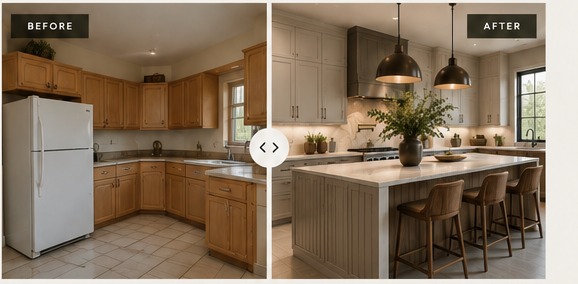
Kitchen before and Reimagine design concept shown side by side
Existing space / Reimagined concept

A visual conversation starter. AI concepts illustrate design direction.

  • Public homeowner experienceUpload a room photo, explore a direction, and submit a project inquiry.
  • Private guided consultationsA staff-only workflow for guiding a customer through design choices.
  • Design selectionsExplore supported project types, door styles, finishes, and other configured choices.
  • Presentation & project connectionPresent concepts and link design submissions and selections to Control Center projects.
More Reimagine features
  • Photo-based AI concepts for supported spaces, including kitchen, closet, built-in, bath/vanity, and garage-storage workflows.
  • Design instructions for requested changes and details to preserve.
  • Before-and-concept comparisons to support the consultation.
  • Separate homeowner, guided consultation, and staff presentation experiences.
  • Customer and project details captured with the design inquiry.
  • Linked source photos and concept images available within the project workflow.
  • Import supported design choices into project selections and approvals.

Reimagine concepts are visual inspiration. Final dimensions, product availability, construction details, and pricing are confirmed separately.

06

Proposals, contracts & payments

Keep the agreement, billing milestones, and customer communication connected to the work.

  • Proposal & contract recordsStore project documents and the signed contract in the customer’s project.
  • Milestone payment trackingTrack deposit, production, and completion payments; 83 uses a 30 / 30 / 40 schedule.
  • QuickBooks invoice connectionPrepare or link supported invoices and refresh payment information.
  • Payment communicationReview payment emails and track the actions due as the job moves forward.
More billing & financing features
  • Signed-contract storage and preparation of a 30% deposit invoice in the current 83 workflow.
  • Invoice sent, due, partial, and paid status tracking where supported.
  • Production and final-payment actions surfaced on the dashboard.
  • Editable payment-email previews before sending.
  • Customer payment schedule information through the portal.
  • Payment and financing pages explaining eligible invoice options.
  • Affirm prequalification information and links in the current 83 setup; actual financing is selected through eligible invoices.
  • Partner billing information tied to the project.

Payment processing and financing depend on the business’s own approved accounts, provider eligibility, and applicable terms.

07

Connected communication

Spend less time hunting through inboxes and more time working from the project in front of you.

  • Project Gmail conversationsFind and attach relevant threads, filter by sender, and read messages inside the Control Center.
  • Scheduling connectionsCalendly booking links, appointment records, and Google Calendar integration.
  • Email & text shortcutsOpen customer and partner communication from the project, with previews for supported outgoing emails.
  • QuickBooks & analyticsConnect billing information and track website activity through the configured services.
More email & integration features
  • Read-only Gmail connection; the project email view does not modify the mailbox.
  • Project email suggestions stay separate until reviewed and attached.
  • Search by customer name, address, or exact phrase to find missing conversations.
  • Attach or dismiss suggested threads and filter conversations by sender.
  • Read full thread messages with the latest reply first and load earlier replies.
  • Gmail links for finding the original conversation; attachments are viewed in Gmail.
  • Project email conversations remain internal to the Control Center.
  • Scheduling invitations and appointment confirmation workflows.
  • QuickBooks invoice links and payment refresh, plus Google Analytics website measurement.

The white label direction

Your name on the front.
Your process at the center.

Start with the parts that fit your business. We can shape the design, language, pages, and workflow around your brand, with the 83 Woodworks platform as the working reference.

01 / SHOW UP

Website & hosting

A distinct identity, clear service pages, a portfolio, lead capture, and a home for your business online.

02 / STAY ORGANIZED

Business workspace

Customer records, leads, project stages, tasks, files, updates, and the portals that help people stay informed.

03 / GO FURTHER

Specialized tools

Explore measurement, production-order, AI visualization, scheduling, and billing workflows suited to the way you work.

Built to fit. Scoped together.

White label builds are tailored projects. Branding, workflows, data setup, integrations, hosting, and support are agreed for each business. Connected tools use the business’s own accounts and approvals.

Talk through your idea ↗

Let’s build what’s next

What could your
website do for you?

Tell Troy what you do, what slows you down, and what you’d like your website to handle. We’ll start with a conversation.

Start with a few details. We’ll follow up by email.